新增进货单
Last modified on 2026-05-11
操作路径:【进货】→【进货】→【新增进货单】
操作步骤:
- 选择供应商
选择供应商名称,点击“+”可快速新增供应商。

- 选择仓库
若已启用多仓库,可为每个商品分别选择仓库。
注:可通过“设置-用户偏好设置”设置进货单的默认仓库。

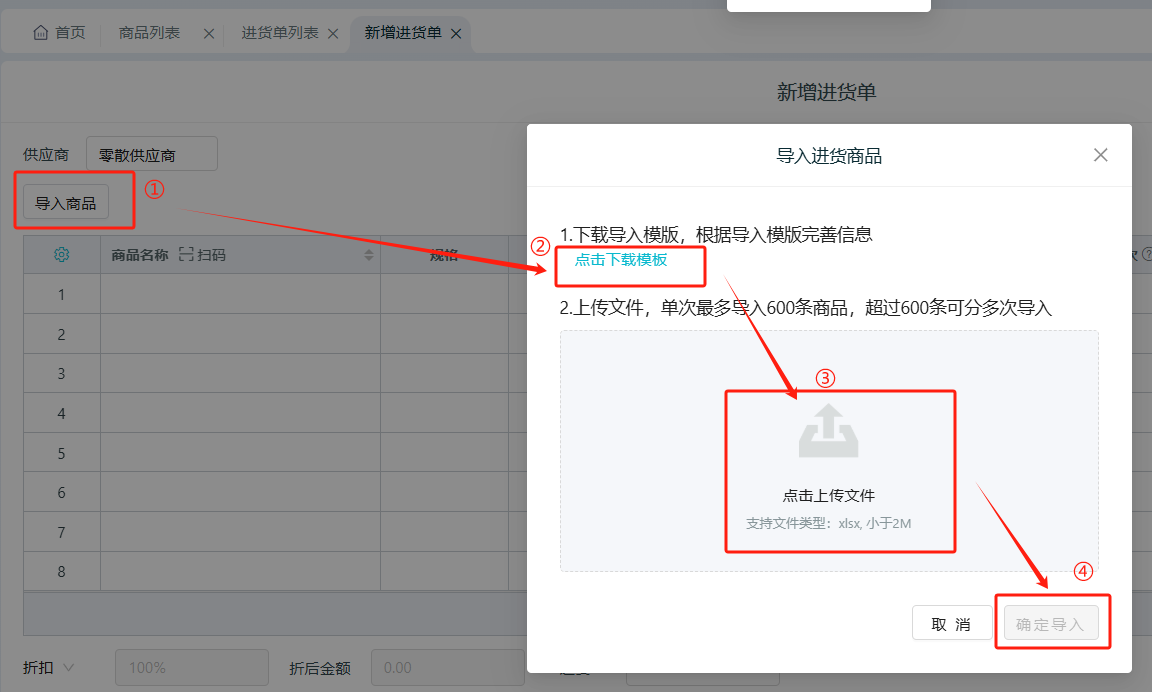
- 添加商品
支持以下两种方式:
- 填写数量与价格
- 手动添加的商品:需在页面中输入数量和进货价。
- 导入添加的商品:可在模板中预先填写数量和进货价。
- 保存单据
- 点击【保存】:直接保存单据;
- 点击【保存并打印】:保存的同时打印;
- 勾选左下角「保存后继续开单」可连续开单。

Kingdee Ailit
is an
inventory management brand under
Kingdee Group.
It provides free
inventory management,
warehouse management, entry and exit management, cash register system, and other functions. It is suitable for
wholesale and retail industries such as clothing and food, supporting membership management and multi-store
collaboration. More than 3 million merchants have upgraded from manual accounting to digital management through
Ailit.